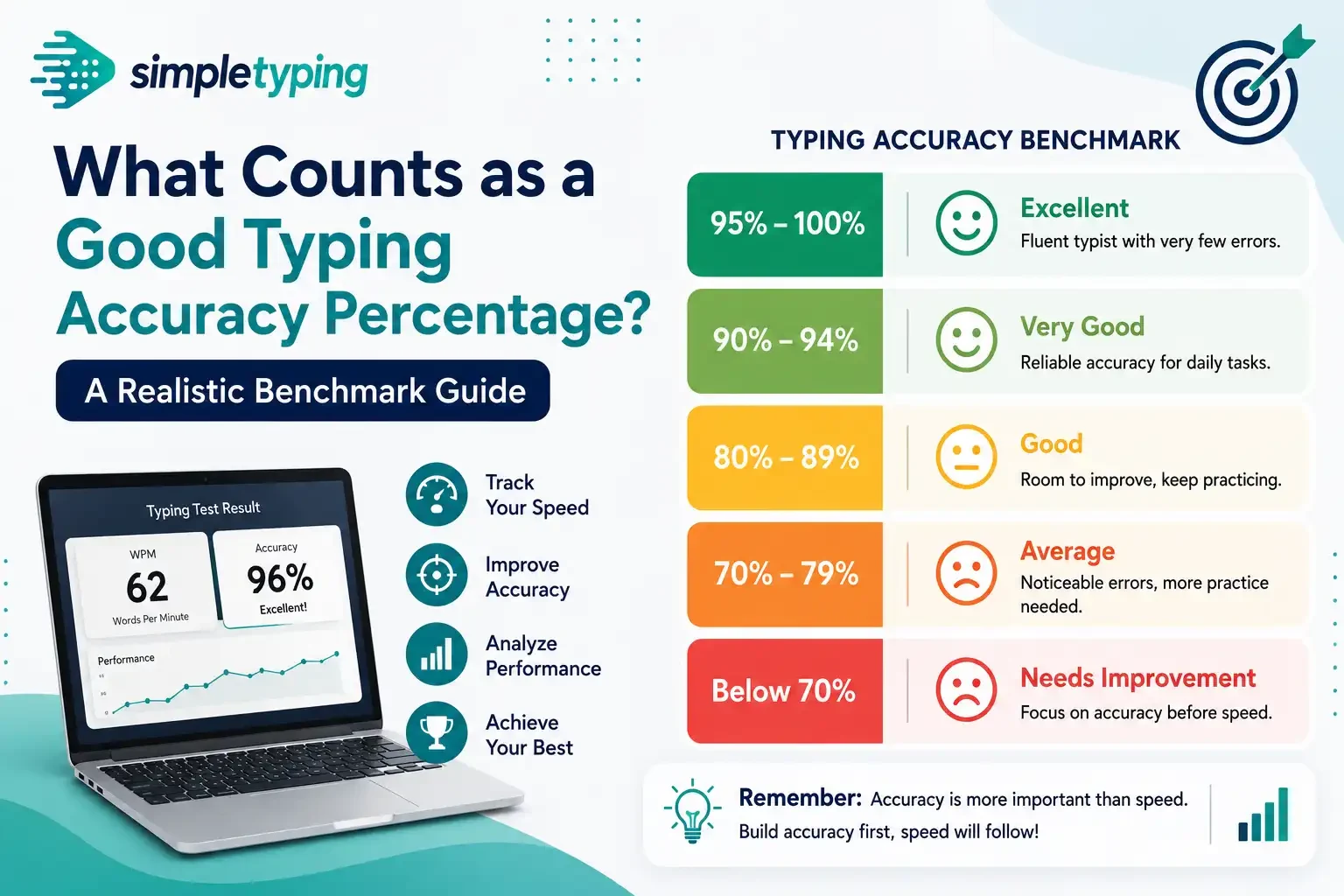
Someone finishes a typing test, sees “92% accuracy” on the results screen, and has no idea if that’s good, mediocre, or a reason to panic before an exam. The honest answer: it depends entirely on what you’re typing for. A 92% that’s perfectly fine for dashing off emails could get you disqualified from a government typing test, and a data-entry employer would raise an eyebrow at it too. This is a numbers piece, not a technique piece — not how to fix your accuracy, just what number you should actually be chasing depending on where you’re using it.
- How typing accuracy is actually calculated
- What counts as good for casual, everyday typing
- What counts as good for professional data entry
- What counts as good for government exam typing tests
- Accuracy benchmarks at a glance
- A real example: two people, two very different targets
- Why accuracy naturally drops as speed goes up
- Key takeaways
- Frequently asked questions
How typing accuracy is actually calculated
Before arguing about what’s “good,” it helps to know what the percentage measures, since it isn’t universal — tools calculate it slightly differently, which is why the same person can score 94% on one site and 97% on another for the same passage. The core formula almost everyone starts from is:
- Accuracy % = (correct characters ÷ total characters typed) × 100
The nuance is what counts as a “total character typed.” Most web-based typing tests — including the ones on this site — only judge what’s on screen when you finish. Mistype a word and fix it with backspace before time runs out, and that error doesn’t count against your final percentage. Some stricter tools instead track every keystroke including backspaces — sometimes called keystrokes-per-character (KSPC) — where heavy correcting quietly costs you. This is usually why two tools disagree on your score for the same paragraph: not a bug, just two definitions of “accuracy.”
Also worth knowing: many government and institutional typing tests report net speed instead of a percentage — gross words-per-minute minus a penalty for every wrong word. It measures the same underlying thing, how clean your output is, but the numbers aren’t interchangeable, so if a notification talks about “deduction per error,” read that specific formula instead of forcing it into a 95%-style target.
What counts as good for casual, everyday typing
For everyday use — chatting, emailing, writing documents — the bar is genuinely low, and most people already clear it without thinking about it.
- 90% and above is comfortably fine. Typos are rare enough that you’re not constantly fixing things, and anything that slips through gets caught by spellcheck anyway.
- 80–90% is still workable but starts to feel sluggish, since backspacing interrupts your flow. Not a crisis, just friction.
- Below 80% usually points to something specific — unfamiliar layout, typing too fast for your skill level, or not having learned proper finger placement — rather than being a normal casual-use range.
The casual bar is forgiving because there’s no real cost to an occasional typo in a text message. For a low-pressure way to see where you land, a quick English typing practice session gives you a live percentage without any exam-style stakes.
What counts as good for professional data entry
The moment typing becomes your actual job function, the acceptable range tightens considerably: a wrong digit in an invoice number or a misspelled name in a records database is a real error that costs someone time to find and fix later.
Employers hiring for data entry, transcription, medical billing, or records-processing roles commonly look for accuracy in the 97–99% range, and for numeric-heavy work some push closer to 99%, since a transposed digit is far easier to miss on review than a misspelled word in prose. Such roles often test speed separately too — commonly 40–60 WPM — but accuracy tends to be the gating requirement, since errors in production data are expensive to trace back and fix. If you’re preparing for this kind of role, practice at a pace slightly below your maximum speed — that’s usually where accuracy stabilizes at professional-grade levels.
What counts as good for government exam typing tests
This is where accuracy stops being a soft guideline and becomes a hard pass/fail line — the category most readers searching this topic actually care about. Government typing tests — the kind attached to SSC, CPCT, court and clerical recruitment, and similar exams — typically apply one of two models:
- A fixed error-count ceiling. The exam allows a maximum number of mistakes (for example, a set number of errors per few hundred words) before the attempt is disqualified outright, regardless of speed.
- A minimum accuracy percentage combined with a minimum speed. You need to clear both — missing either one typically fails the attempt, even if you comfortably clear the other.
As a general, illustrative range (not a guarantee for any specific exam): many such tests treat 95% and above as the safe zone, with stricter tests effectively expecting closer to 97–98%. Because exact thresholds genuinely vary between exams and change across notification cycles, treat any number here as a planning benchmark, and always cross-check the current official notification before test day. The government exam typing practice section on this site is built around exam-format drilling, and it’s worth practicing in both English and, where required, Hindi typing, since several tests carry a Hindi-language option with its own accuracy expectations.
Accuracy benchmarks at a glance
The whole picture side by side, so you can find your own context quickly.
| Context | Typically “good” accuracy | What happens if you fall short |
|---|---|---|
| Casual / everyday typing | 90% and above | Nothing formal — just more backspacing and slower flow |
| Student practice / building the habit | 92–95% | No penalty, but a useful signal you’re ready to push speed |
| Professional data entry / transcription roles | 97–99% | May not clear employer screening or probation review |
| Government exam typing tests (typical/illustrative) | 95% and above, exam-dependent | Risk of disqualification regardless of speed — verify exact rule per exam |
| Typing certificates / competitive typing | 96% and above | Lower-tier certificate or missed leaderboard placement |
A real example: two people, two very different targets
Priya is preparing for a CPCT-style government exam and has been practicing timed passages for six weeks. Her speed climbed fast — 28 WPM to 42 WPM in about a month — but her accuracy dropped from 96% to 91% in the same stretch, because she kept pushing pace without dialing back to consolidate. That 91% is a problem for her goal even though 42 WPM sounds like progress; she needs to slow down for a week or two and let accuracy climb back above 95%, since in her exam a fast attempt that fails the accuracy cutoff is worth zero.
Rohit, meanwhile, does routine data entry, typing a steady 38 WPM at 98% accuracy. He’s not fast by exam standards, but for his actual job that 98% is exactly what’s needed, and his output has never been flagged for errors. Same underlying skill, two very different scorecards — the whole point of this article. There’s no single “good” accuracy number, only the number that matters for what you’re measured against.
Why accuracy naturally drops as speed goes up
Worth understanding briefly, since it explains why benchmarks differ by context. Typing accuracy and speed pull against each other up to a point — push your pace past your comfort level and error rate rises, since you’re leaning more on muscle-memory guesses and less on verified keystrokes. That’s exactly why exam-style tests set a combined bar rather than a speed-only one: a blazing-fast attempt full of mistakes is often worse, to an evaluator, than a moderately-paced clean one. The bar rises with the stakes, not with some universal standard of skill.
Key takeaways
- Accuracy is generally correct characters divided by total characters typed — most web-based tests only judge your final, corrected text, not every backspace.
- 90%+ is a perfectly good target for casual, everyday typing.
- Professional data entry roles typically expect 97–99% accuracy, since errors in production data carry a real cost.
- Government exam typing tests commonly treat 95% and above as the safe zone, but exact thresholds vary by exam — always check the specific notification.
- Some exams measure net speed with per-error deductions instead of a flat percentage — know which model your target exam uses.
- The right accuracy target depends entirely on what you’re being measured for, not on a single universal number.
Frequently asked questions
Is 90% typing accuracy good?
For casual, everyday typing, yes — a comfortable, workable level. For professional data entry or government exam typing tests, 90% is usually below the expected bar, so context matters more than the number itself. As a rule of thumb: 90%+ for casual use, 95%+ for exam-style typing, and 97%+ for professional data entry.
How is typing accuracy calculated?
The standard formula is correct characters divided by total characters typed, multiplied by 100. Most online typing tests compare only your final, corrected text against the source passage, so fixing a mistake with backspace before finishing typically doesn’t hurt your score.
Do backspaces count against my accuracy score?
On most modern typing test tools, no — only the final text on screen is scored. Some stricter keystroke-level tools track every backspace as an extra keystroke, which is why different tools report different numbers for the same test.
What accuracy percentage do government typing exams require?
It varies by exam, but a commonly cited, illustrative range is 95% and above, sometimes expressed as a maximum allowed number of errors instead. Rules differ between exams and change between notification cycles, so verify the exact requirement in the official notification.
What typing accuracy do employers expect for data entry jobs?
Most data entry, transcription, and records-processing roles look for accuracy in the 97–99% range, particularly for numeric or financial data where a wrong digit is costly to catch later.
Can I fail a typing exam even with a fast WPM if my accuracy is low?
Yes, in most government-style typing tests. Many set a combined requirement, so a fast attempt below the accuracy or error threshold typically fails regardless of speed.
Why do two typing test websites show different accuracy for the same test?
Usually because they calculate it differently — one may score only your final corrected text, while another tracks every keystroke including backspaces. Different error-weighting is the most common cause of mismatched scores.
Is there a difference between accuracy percentage and net typing speed?
Yes. Accuracy percentage measures correctness as a ratio, while net speed subtracts a penalty per error from your gross words-per-minute. Related, but not the same figure.
Should beginners focus on accuracy or speed first?
Most typing practice guidance suggests prioritizing accuracy early, since speed tends to build naturally on top of clean, consistent keystrokes. A beginner comfortably above 90% accuracy is generally well positioned to start pushing pace.
Does accuracy requirement differ between English and Hindi typing tests?
The underlying calculation is the same, but Hindi typing on layouts like Kruti Dev or Mangal often involves more keystrokes per character due to conjuncts and matras, which can make matching accuracy somewhat harder at equivalent speed. Check exam-specific thresholds per notification, since they can differ by language paper.
How can I check my current typing accuracy against these benchmarks?
Run a timed test on a passage similar to what you’ll actually be typing — exam paragraphs for exam prep, general prose for casual or professional practice — and compare your reported percentage against the relevant range above.
If you want to see exactly where your own number falls, run a few timed passages on SimpleTyping’s English typing practice and watch how your accuracy holds up as you push your speed — then, if you’re prepping for a government test, switch to the exam-format typing practice section to see how you’d fare against real exam-style thresholds. A free account also lets you track your accuracy trend over time instead of judging yourself off a single test.








